// 2026-05-20 · Tools & Utilities · by Bob Smith
Ninite: Install All Your Apps in One Click
Ninite lets you tick the Windows apps you want and builds a single installer that sets them all up silently, with no toolbars, no next-next-next, no junk.
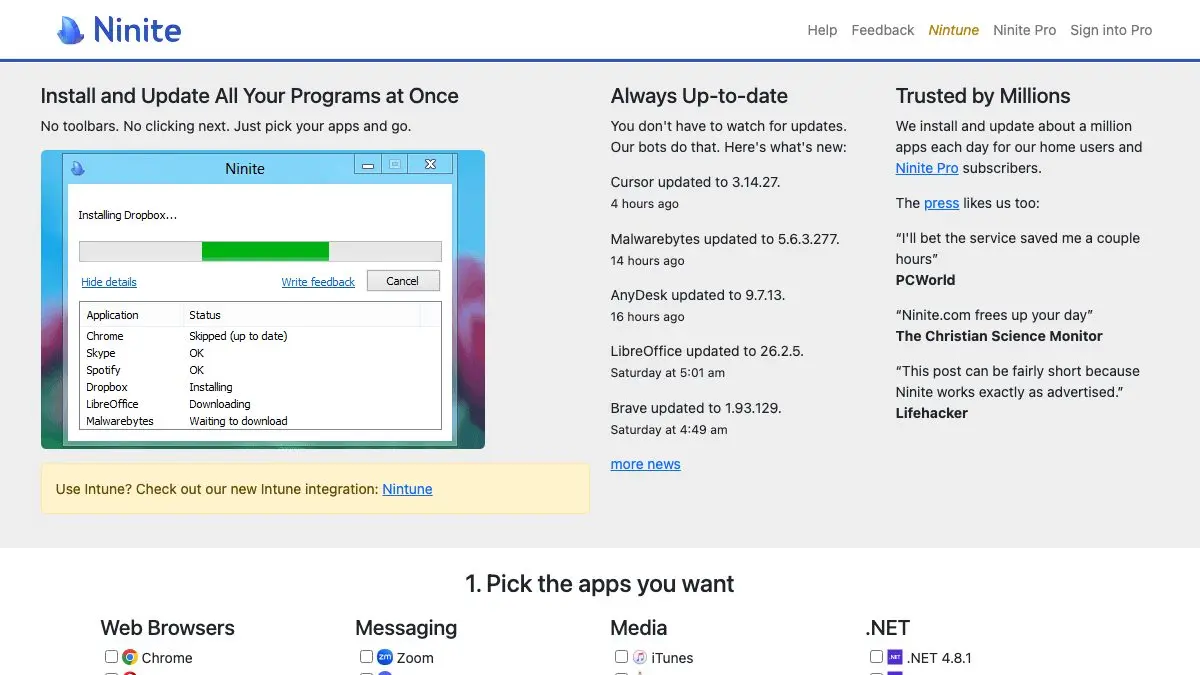
Setting up a new Windows machine used to mean an afternoon of downloading installers, dodging bundled toolbars and clicking Next forty times. Ninite kills that afternoon. Tick the apps you want on one page, download a single small installer, run it, and walk away. It installs all of them silently, says no to every piece of junk on your behalf, and it’s free for home use.
What is Ninite?
Ninite is a very old-school kind of good: one page, a grid of checkboxes, one button. Pick your browser, your media player, your chat apps, your compression tool, your runtimes. Hit “Get Your Ninite.” You get a tiny custom .exe named after everything you selected.
Run it and nothing happens, which is the point. No wizards. No “would you like to also install this search bar.” No restart nags. The installer works in the background, pulling each program from its publisher’s official site, verifying digital signatures before it runs anything, picking the 64-bit build and the right language automatically. The site’s own promise is that it will “not bother you with any choices or options” and will “say no to toolbars or extra junk,” and it means it.
The catalog covers over 100 applications: web browsers, messaging, media players, .NET and Java runtimes, image editors, document readers, security tools, file sharing, cloud storage, general utilities, compression, Visual C++ redistributables and developer tools.
Windows only, Windows 11, 10, 8.x, 7 and the matching Server versions.
What can you do with Ninite?
- Build a new-PC starter pack. The classic use. Fifteen apps, one download, zero decisions. What used to be an hour is now a coffee break.
- Update everything at once. Keep the installer file. Run it next month and it skips anything already current and updates the rest. It is the closest thing Windows has to a one-button
apt upgrade. - Install the boring-but-necessary stuff. Runtimes and redistributables: the things that break random software when they’re missing, are all in the list. Tick them once, forget them.
- Fix a relative’s laptop remotely. Send them a link to a pre-built installer. They double-click. Done. No screen-sharing session where you narrate “no, don’t accept that one.”
- Manage a fleet. Ninite Pro is the paid tier for organizations, adding a web interface for patching and updating software across many machines.
Tips to get the most out of it
- Bookmark your installer URL, not the file. The download link encodes your selections. Save that URL and you can regenerate a fresh, current installer any time on any machine, no need to keep the .exe around.
- Make two profiles. A lean “essentials” installer for other people’s computers, and a maximalist one for your own. Different URLs, same two seconds of effort.
- Run it as your monthly update ritual. Set a reminder, double-click, go make tea. It’s faster than opening five apps and clicking their individual “check for updates.”
- Uncheck things you’ve already got a preference for. Ninite installs a default configuration; if you have a heavily customized setup of some app, let Ninite handle everything else and leave that one to you.
- Use it after a Windows reinstall, before anything else. Browser, archiver, PDF reader, runtimes, those four categories in one pass gets a fresh machine usable in about five minutes.
If you like Ninite, also try…
- PairDrop: the other “why isn’t this built in” utility. Send files between your devices in the browser, no cables, no accounts.
- CloudConvert: turns one file format into another without installing anything at all.
- JustDeleteMe: the cleanup counterpart. Fresh machine, fresh app list, and now go delete the accounts you never use.
Plenty more where that came from in Tools & Utilities.
Frequently asked questions
What is Ninite?
Ninite is a free web service that bundles your chosen Windows applications into a single custom installer. You tick the apps you want on the homepage, download one small .exe, and it installs every one of them silently in the background. It skips options, declines toolbars and pulls each app from the publisher's official site.
Is Ninite free?
Ninite is free for home use, free of charge, and also free of ads and bundled junkware. There is a paid tier, Ninite Pro, aimed at organizations that need to patch and manage software across many machines from a web dashboard.
Does Ninite work on Mac or Linux?
No. Ninite supports Windows 11, 10, 8.x, 7 and the equivalent Server versions. Support for Windows XP and Vista ended in February 2019. There is no macOS or Linux version.
Can I use the same Ninite installer to update my apps later?
Yes, and that is the trick most people miss. Keep the .exe you downloaded and run it again any time, it reinstalls nothing that is already up to date and quietly updates everything that is not. One double-click is your whole update routine.