// 2026-05-19 · Privacy & Security · by Bob Smith
JustDeleteMe: Delete Any Account, Fast
JustDeleteMe is a free directory of direct account-deletion links for hundreds of web services, each rated easy, medium, hard or flat-out impossible.
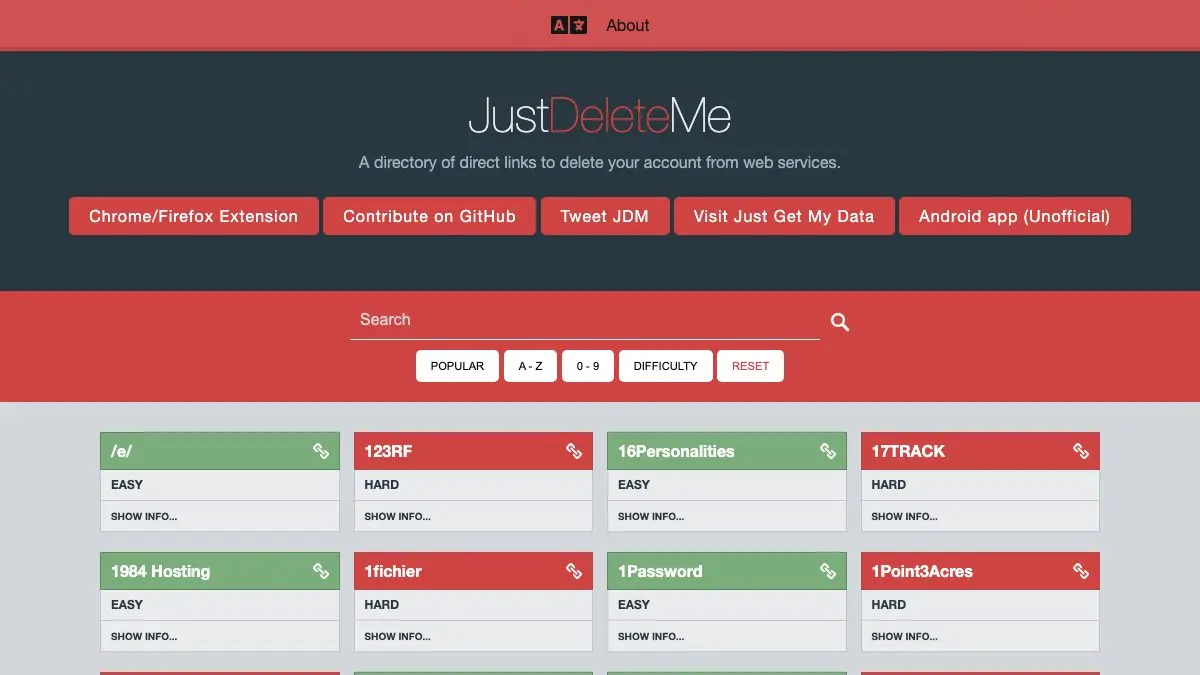
You signed up for a forum in 2014 to ask one question. It still has your email, your birthday and a profile photo you’d rather forget. JustDeleteMe is a free, open-source directory of direct account-deletion links for hundreds of web services, each one rated by how much of a fight it will be. Search the name, click the link, get out.
What is JustDeleteMe?
Here’s the dirty secret of the modern web: signing up takes eleven seconds and deleting takes eleven emails. The “delete account” button is buried under three menus, renamed “close membership,” or simply doesn’t exist. That’s not an accident. That’s design.
JustDeleteMe is the counter-move. It’s a plain, fast, searchable list of services with a deep link straight to the page where you can actually pull the plug. No blog post about it. No twelve-step tutorial video. Just the link, plus a color-coded honesty rating so you know whether this is a two-click job or a hostage negotiation.
The ratings are the best part:
- Easy: you can delete it yourself from account settings. Go, be free.
- Medium: extra hoops. Confirmation emails, waiting periods, a form.
- Hard: you have to contact support and ask nicely. Bring patience.
- Impossible: there is no deletion option. The account is forever.
- Limited availability: deletion depends on where you live or how you signed up.
Seeing “Impossible” next to a household-name service is a genuinely useful jolt. It tells you something about a company that no marketing page ever will.
What can you do on JustDeleteMe?
- Search by name. Type the service, get the link. That’s the whole flow.
- Filter by difficulty. Want to knock out ten easy ones before dinner? Filter to Easy and speedrun your digital spring cleaning.
- Read the notes. Many entries have a show/hide info toggle with the actual instructions: where the button hides, how long the recovery window lasts, what they keep afterward.
- Copy an email template. For the “Hard” services that make you write in, there are ready-made request texts. No need to compose a polite paragraph at 11pm.
- Install the extension. The Chrome and Firefox extension surfaces a site’s rating while you’re browsing it, which is a nice little ambient nudge.
- Grab your data first. The companion site Just Get My Data covers the other half of the problem: downloading everything a service holds on you before you nuke the account.
It’s all free, all open source, and the entries are maintained by people who clearly enjoy exposing this stuff.
Tips to get the most out of it
- Export before you delete. Always. Once an account is gone, so are the order history, the photos and the receipts. Do the data download first, then come back.
- Start with your password manager. Open the vault, sort by “never used,” and run each one through JustDeleteMe. Most people find twenty forgotten accounts in one sitting. It’s weirdly satisfying.
- Check the recovery window. Plenty of services “delete” your account but hold it in cold storage for 14 or 30 days, and logging back in during that window quietly cancels the whole thing. Don’t log back in.
- Do the Impossible ones anyway. If a service can’t be deleted, you can still gut it: strip the profile, swap the email to an alias, scramble the name. An empty shell beats a full one.
- Watch out for shared logins. Deleting the account you used to sign up for other things via “Continue with…” can lock you out of those too. Untangle first, delete second.
If you like JustDeleteMe, also try…
- Have I Been Pwned: find out which of those forgotten accounts already leaked your email in a breach. Great motivation for the cleanup.
- Cover Your Tracks: a live test of how uniquely identifiable your browser is. Deleting accounts is one half of privacy; not being fingerprinted is the other.
- Ninite: since you’re in a fresh-start mood, this rebuilds a clean set of desktop apps in one click, with zero bundled junk.
More like this in Privacy & Security. Go delete something.
Frequently asked questions
What is JustDeleteMe?
JustDeleteMe is a free directory that collects direct account-deletion links for hundreds of websites and apps. Each service gets a difficulty rating and, where needed, step-by-step instructions or an email template. It exists because companies rarely make the delete button easy to find.
Is JustDeleteMe free?
Yes. JustDeleteMe is completely free to use and open source, with the code published on GitHub. There is no account, no paywall and no signup required to browse the directory.
What do the JustDeleteMe difficulty ratings mean?
Services are rated Easy (delete yourself from settings), Medium (extra steps or a waiting period), Hard (you must contact support), Impossible (no deletion option exists), and Limited Availability (deletion depends on your country or circumstances). The rating tells you what you are in for before you start.
Does JustDeleteMe have a browser extension?
Yes, there is a browser extension for Chrome and Firefox so you can check a site's deletion difficulty while you are on it. There is also an unofficial Android app on F-Droid and a companion project, Just Get My Data, for requesting a copy of your data before you delete.