// 2026-08-05 · Music & Audio · by Bob Smith
Listen to Wikipedia: Every Edit on Earth, Played as a Note
Listen to Wikipedia turns the live stream of Wikipedia edits into sound: a bell for every addition, a string pluck for every deletion, pitched by edit size.
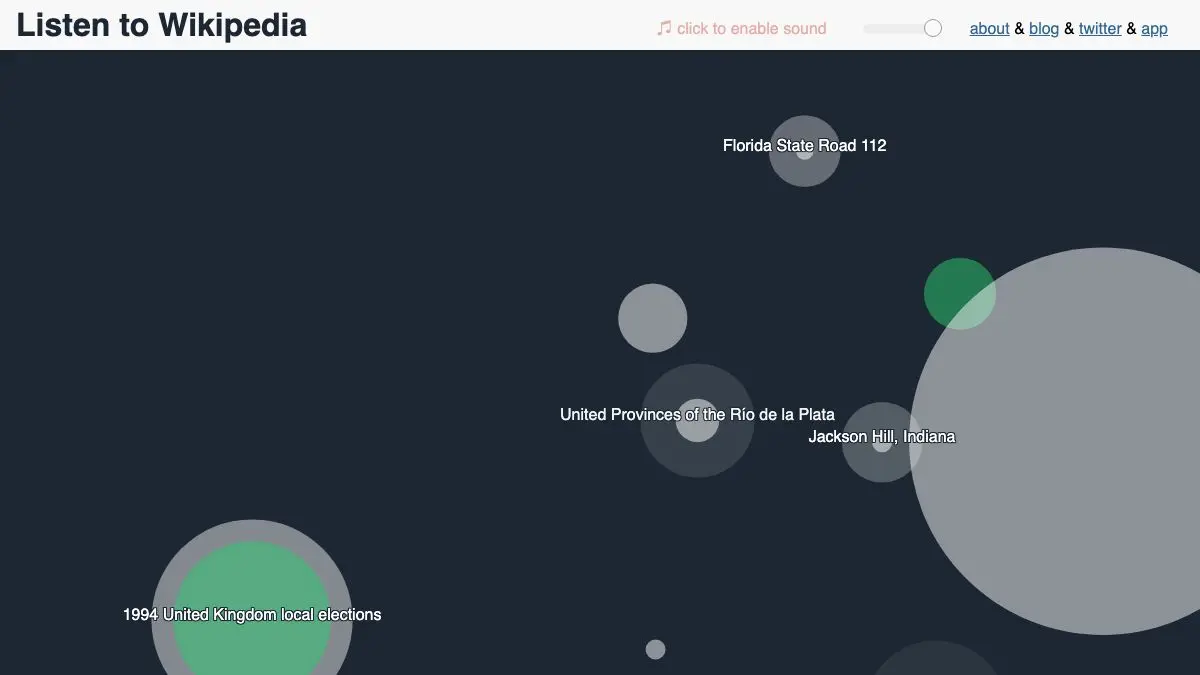
Listen to Wikipedia plays you the sound of the world writing an encyclopedia. Every edit made to Wikipedia, right now, anywhere, becomes a note. Bells for things added, plucked strings for things taken away, low for a big change and high for a small one. Circles bloom on a dark screen as they sound. It is oddly beautiful and it never stops, because Wikipedia never stops.
What is Listen to Wikipedia?
It was built by Hatnote, a two-person project that has made a number of small tools around Wikipedia data, and it’s been running since 2013. The mechanism is simple: Wikipedia broadcasts a public real-time feed of every change to every article, and this page subscribes to it and assigns each event a sound and a circle.
The mapping is what makes it work. Pitch is inversely related to edit size, so a corrected comma is a high delicate chime and someone rewriting an entire section is a deep resonant note that you feel in the room. Additions get bells, removals get strings. Circle size scales with the edit too, so a big change is both louder in the register and larger on screen. Color separates who’s editing: anonymous IP contributors, logged-in users, and the automated bots that do the tireless unglamorous work of fixing links and categories.
There’s one more event, and it’s the one people fall for. When a new user account is created, the page announces it with a swelling string chord and a name. Somewhere in the world, at that exact second, a person decided to sign up and start editing an encyclopedia. It happens constantly. The site turns that into something like applause.
The whole thing is a demonstration of a general principle: some data is easier to feel than to read. A table of Wikipedia edit rates is inert. The same numbers as sound tell you immediately that English Wikipedia is a downpour, that activity has a daily rhythm as time zones wake up, and that bots outnumber humans in ways a chart would take a paragraph to explain.
It’s also, genuinely, pleasant to have on. The tones are consonant, the pacing is irregular but never jarring, and it makes a decent ambient bed for work. People have left it running for hours. The source is open, and Hatnote made companion versions for Wiktionary and Wikidata, if you want to hear a dictionary or a structured knowledge base instead.
What can you do with Listen to Wikipedia?
- Just open it and leave it running. No setup, no account. It starts making noise immediately and works as ambient audio.
- Filter by language edition. Choose one language or several. English alone is dense; a small edition produces long silences punctuated by single notes.
- Watch the bots work. Automated edits are color-coded and have a distinct rhythm, arriving in fast regular bursts unlike human editing.
- Listen for new users. The swelling chord and the announced username is the event worth waiting for.
- Use it as an activity clock. Edit volume rises and falls with the working day across time zones. Listen at 4am and the texture is completely different.
- Read the code. The project is open source, and it’s a compact, readable example of turning a websocket event stream into audio and animation.
- Try the sibling versions. Wiktionary and Wikidata have their own streams and their own very different densities.
Tips to get the most out of it
Turn the volume down further than feels right. At normal listening level the bells are too present to work behind anything. Quiet, it becomes weather.
Try a small language edition for the drama. English is a wall of sound and nothing stands out. Switch to a smaller edition and every single note is an actual person, alone, editing an article about something in their language at this moment. It’s a different experience entirely.
Watch for the deep notes. A very low tone means someone just made a large change. Click through to the article if the visualization offers it; large edits are where the interesting activity is, from major expansions to vandalism to the reverts that follow.
Leave it on during a news event. Article activity spikes visibly and audibly when something big happens. The encyclopedia updating itself in real time is one of the more reassuring sounds available.
Compare morning and midnight. Same site, entirely different soundscape. It’s the clearest demonstration you’ll get that Wikipedia is written by people on schedules.
Pair it with a second tab of actual work. It sounds like a distraction and functions as the opposite. The irregularity keeps it from becoming a rhythm you start following.
If you like Listen to Wikipedia, also try…
- World Births and Deaths: another live-data visualization that turns a global statistic into something you watch happen.
- Orb Farm: a tiny self-contained ecosystem in a browser tab, equally good at doing nothing usefully.
- Every Noise at Once: data visualization and music discovery collapsed into the same scrollable object.
- Chrome Music Lab: more browser experiments that make abstract things audible.
More sound-shaped curiosities in Music & Audio, and more live-data oddities in Data & Research.
Frequently asked questions
What is Listen to Wikipedia?
Listen to Wikipedia is a browser visualization and sonification of Wikipedia's live edit stream. Every time someone edits an article, a circle appears on screen and a note plays: bells for additions and string plucks for removals, with pitch determined by the size of the edit. It was built by Hatnote and its source code is publicly available.
Is Listen to Wikipedia free?
Yes, it is completely free with no account, no ads, and nothing to install. It runs entirely in a browser tab and connects to Wikipedia's public real-time change feed.
What do the sounds and colors mean?
Bells indicate content being added and string plucks indicate content being removed. The larger the edit, the lower the pitch, so a small typo fix is a high chime and a major rewrite is a deep tone. Circle color distinguishes types of editor, separating anonymous contributors, registered users, and automated bots.
Can I listen to Wikipedia in other languages?
Yes. The page lets you select which language editions to include, and you can run several at once or narrow it to a single one. Smaller language editions produce a sparse, slow soundscape, while English on its own is a nearly constant stream of activity.