// 2026-08-09 · Productivity · by Bob Smith
When2meet: Find a Time Everyone Can Make, With No Accounts and No Email
When2meet turns group scheduling into one shared grid you paint your availability onto. No signup, no email, no app, just a link and a dark green block where everyone overlaps.
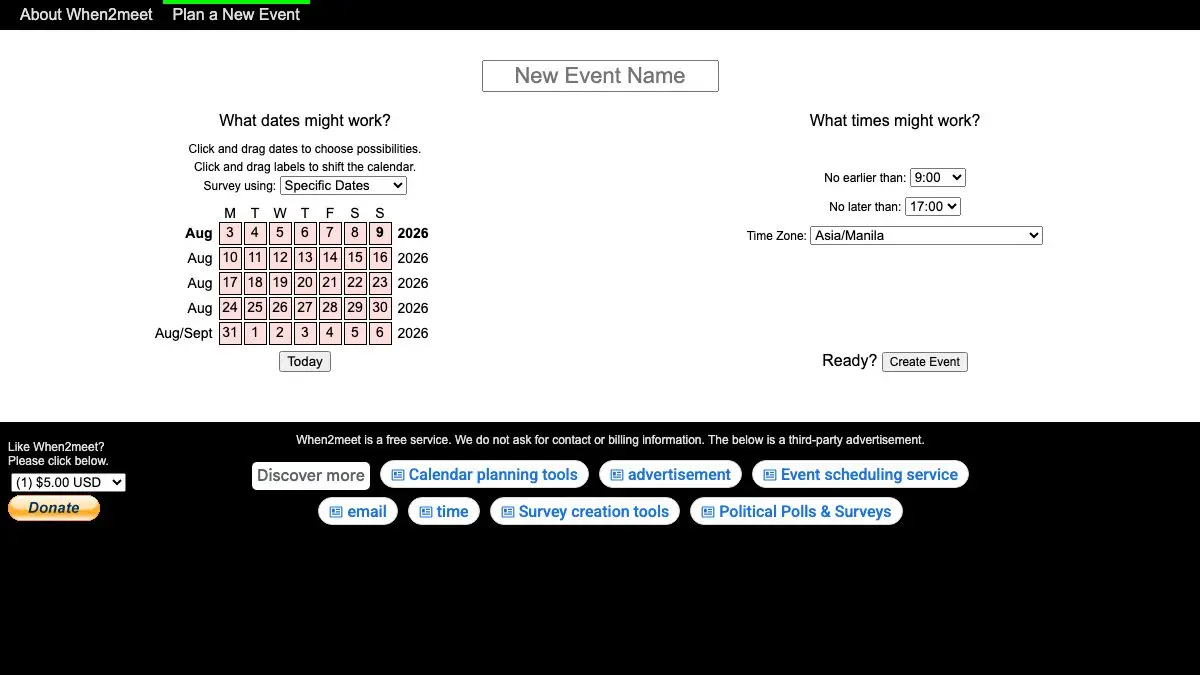
Deciding when six people can meet is a problem that group chats are catastrophically bad at solving. Someone proposes Tuesday, two people reply, one of them replies to the wrong message, and forty minutes later nobody knows anything.
When2meet fixes it with a grid. You choose a window of dates and hours, share one link, and everyone drags over the times they can make. The slot where the most people overlap turns the darkest green. That is the entire product, and it has needed no more than that for well over a decade.
What is When2meet?
When2meet is a free availability survey. Creating one takes about fifteen seconds: name the event, click and drag across a calendar to pick candidate dates, set the earliest and latest hours worth considering, choose a time zone, hit Create Event. You get a URL, and the URL is the whole thing.
Everyone you send it to sees two grids side by side. On the left, their own availability, painted by dragging. On the right, the group result, where every cell is shaded in proportion to how many people can make it. Hover any cell and it lists exactly who is available and who is not, which is far more useful than a bare count when you are trying to work out whether the meeting can survive without one particular person.
Participants type a name and nothing else. There is no signup, no email, no confirmation step. When2meet says outright that it does not ask for contact or billing information, and the site is old enough and plain enough that you can believe it. It is funded by a small strip of ads under the grid and an optional donation button, both of which stay out of the way.
What can you do on When2meet?
- Create an event in seconds with no account, and share it as a single link.
- Paint availability by dragging, in either direction, rather than ticking dozens of individual checkboxes.
- Survey specific dates or days of the week. The second mode is for recurring things, a weekly practice or a regular standup, where the actual date does not matter.
- Let everyone answer in their own time zone. Each participant picks theirs and the grid redraws in local time.
- Hover any slot to see names, split into who can make it and who cannot, so you can decide whether a near-miss is good enough.
- Set an optional password on your own row so nobody else edits your availability by accident.
- Come back and change your answer at any time by reopening the link and entering the same name.
- Watch results fill in live as people respond, rather than waiting for a final tally.
Tips to get the most out of it
- Keep the window tight. A survey covering three weeks and every hour of the day gives people a wall of squares and gets vaguer answers. Two or three plausible days beats a fortnight of maybes.
- Answer honestly, not optimistically. The grid only works if “available” means available. One person shading in times they would rather not do produces a meeting nobody wanted.
- Fill in your own availability before you send the link. It seeds the grid, and it makes clear what the responses are supposed to look like.
- Bookmark the link the moment you create it. There is no account, so that URL is your only route back to the event. Pin it in the chat you shared it in.
- Use the password field on shared computers. Without it, anyone who opens the link and types your name can edit your row.
- Trust the hover, not just the colour. The darkest block is the most popular time, but hovering tells you who is missing, and sometimes the second-darkest slot is the one that actually works.
If you like When2meet, also try…
- InviteCount: once the date is settled, for the events that deserve a proper page and a real RSVP list.
- World Chat Clock: find the overlapping working hours first, then run the survey inside them.
- Time and Date: the reference for the calendar and time zone questions that come up around any scheduling.
- CryptPad: if the agenda and the notes for the meeting should stay private too.
Browse more tools that get out of your way in our Productivity collection.
Frequently asked questions
What is When2meet?
When2meet is a free group scheduling tool. You pick a range of dates and hours, it gives you a link, and everyone who opens that link drags across a grid to shade in when they are free. A second grid combines everybody's answers, shading each slot darker as more people are available, so the best time to meet is literally the darkest block on the screen. It has done this one job since the early 2010s and has barely changed, which is the point.
Do you need an account to use When2meet?
No, and there is no account to make. The organiser fills in a form and gets a URL. Participants open that URL, type a name, and start dragging. When2meet states plainly that it does not ask for contact or billing information, so nobody has to hand over an email address to say they are free on Thursday. The optional password is only there to stop other participants editing your row, not to create an account.
Does When2meet handle time zones?
Yes, and this is where it quietly beats a group chat. The organiser sets a time zone when creating the event, and each participant picks their own when they respond. The grid is redrawn in whatever zone you selected, so everyone paints their availability in local time and the overlap is calculated correctly underneath. For a group spread across continents that removes the single most common scheduling mistake.
Is When2meet free, and how is it funded?
It is free for both creating and answering surveys. When2meet says ads help cover the operating costs, and there is a small block of third-party advertising below the scheduling grid plus an optional donation button. The service is run by 8 Degrees LLC. There is no paid tier, no feature held back, and no upsell in the middle of your survey.