// 2026-08-05 · Design & Creativity · by Bob Smith
Image Colour Transfer: Steal One Photo's Palette for Another
Image Colour Transfer takes the color character of one photograph and applies it to another, entirely in your browser, with several algorithms to compare.
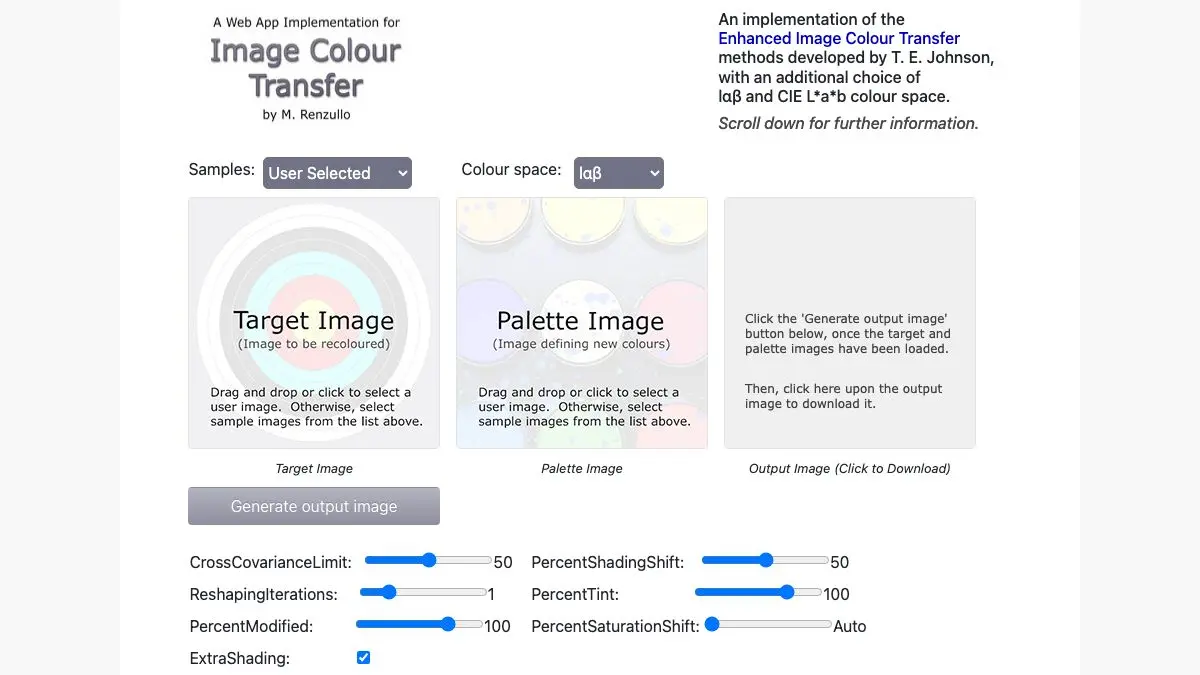
Image Colour Transfer answers a question every photographer has had: this shot is fine, but why doesn’t it look like that one? Feed it your photo and a photo whose color you envy, and it rewrites yours to match. Not by slapping a preset on top, but by actually measuring how color is distributed in the reference and reshaping your image to fit.
The interface looks like it was built in 2011 and never touched since. The results are better than most things with a design team.
What is Image Colour Transfer?
Color transfer is a real technique from image processing research. The core idea, popularized by a 2001 paper from Reinhard and colleagues, is disarmingly simple: convert both images to a color space where the channels do not fight each other, measure the mean and standard deviation of each channel in both, then shift and scale the target’s numbers until they match the source’s. Convert back. The target now has the reference’s color temperature, saturation and tonal spread, while keeping every detail of its own content.
Later researchers improved on it in various ways, handling the correlations between channels properly, matching full histograms instead of just two statistics, working in different color spaces. Each approach has different failure modes.
What this site does is put a pile of those methods in one page and let you run them all on your own images. That is genuinely rare. Papers usually come with a few cherry-picked examples and, if you are lucky, a MATLAB script. Here you get a working comparison bench.
The site is run under the Dust Free Solutions name and reads like the work of someone who cared more about the math being right than about the page looking modern. The layout is dense, the controls are unlabeled in places, and there is a lot of explanatory text if you scroll. It rewards ten minutes of poking.
Practically, this is the tool you want when you have a set of photos shot under mismatched lighting and you need them to feel like one series. Pick the frame that looks best, use it as the reference, and pull the others toward it.
What can you do with Image Colour Transfer?
- Match a photo to a reference. Load your target image and a source image, run the transfer, and download the result.
- Compare algorithms on the same pair. The main draw. Run several methods on identical inputs and see exactly where each one falls apart.
- Unify a mismatched photo set. Shots from different cameras, different times of day, or different white balance settings, dragged toward a common look.
- Grade a photo toward a film stock. Use a scanned film frame as the reference and your digital shot inherits its color response.
- Fix a bad white balance. A correctly balanced photo of a similar scene makes an excellent reference for a badly balanced one.
- Build mood boards that actually agree. Push a collection of found images toward one palette so they read as a set.
- Study the technique. Read the accompanying notes alongside the outputs if you want to understand what is happening rather than just use it.
Tips to get the most out of it
Choose a reference with similar content. Color transfer works on statistics, not on understanding. A reference that is 70 percent sky applied to a photo that is 70 percent forest will push all that green toward blue. Match the rough composition and the results improve dramatically.
Try every algorithm before you judge the tool. The default method is not always the best one for your pair. Some handle high-contrast references gracefully and some blow out the highlights. Running all of them takes seconds.
Resize large images first. Everything happens in the browser, so a 45-megapixel raw export will make your fan spin. Test at a small size, find the settings you want, then run the full-resolution version once.
Watch for clipping in the extremes. The most common artifact is crushed shadows or blown highlights where the transformation pushed values past the ends of the range. If it looks wrong, it usually looks wrong there first.
Use it as a starting point, not a finish. The output is a graded base. Take it into a proper editor for the last ten percent rather than expecting a final image.
Keep a folder of good references. Once you find a few images that produce results you like, they become reusable. A personal reference library is more useful than any preset pack.
If you like Image Colour Transfer, also try…
- Coolors: extract a palette from any uploaded image and take the hex codes elsewhere.
- Photopea: a full Photoshop-grade editor in the browser for finishing what this starts.
- iPiccy: lighter-weight browser photo editing when you just need crops, curves and retouching.
- Squoosh: compress the finished image properly before you put it anywhere near a web page.
More browser-based image tinkering in Design & Creativity, and more single-purpose utilities in Tools & Utilities.
Frequently asked questions
What is Image Colour Transfer?
It is a free browser tool that takes two images, a target and a palette source, and rewrites the colors of the target so it takes on the color character of the source. It implements several published color transfer algorithms side by side so you can compare how each one handles the same pair of images.
Is Image Colour Transfer free?
Yes. It runs as a plain web page with no account, no sign-up and no watermark on the output. It is closer to a published demonstration of the technique than a commercial product.
Are my photos uploaded to a server?
The processing happens in the browser on your own machine, so images are not sent off to be handled elsewhere. That also means very large files depend on your own hardware, and a slow machine will take longer on a big photo.
How is this different from a filter or a LUT?
A filter or LUT applies a fixed transformation regardless of what is in your photo. Color transfer derives the transformation from a specific reference image, matching the statistical distribution of colors, so the result is tailored to that exact pair of pictures rather than being a preset.