// 2026-08-05 · Entertainment & Fun · by Bob Smith
GeekTyper: Pick a Hacking Interface and Mash the Keyboard
GeekTyper lets you choose from dozens of fictional hacking interfaces, then fills the screen with code as you mash any keys. Pure movie-hacker theater, free.
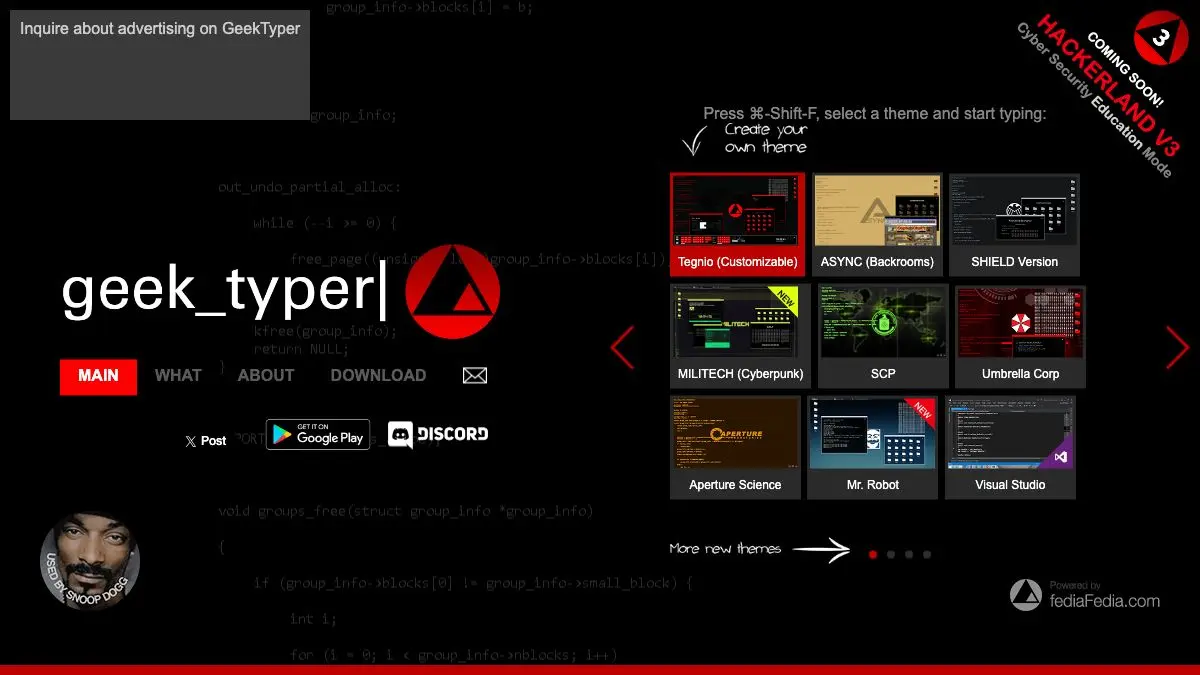
GeekTyper exists to make you look like you are doing something extremely important. Pick an interface, mash the keyboard, and code you did not write floods the screen at a plausible rate while progress bars fill and dialogs announce that access has been granted. It is the hacking scene from every movie ever made, rendered as a website, and it is free.
The trick is old. The execution is unusually good.
What is GeekTyper?
The core mechanic is one line of JavaScript conceptually: ignore what the user actually typed, and print the next few characters of a stored text file instead. Hacker Typer did it first and became a meme. GeekTyper took the same idea and asked a better question, which is why does it have to look like one thing?
So instead of a single terminal, you get a homepage full of themes. Corporate security consoles. Fictional megacorporation dashboards. Government tracking systems. Retro terminals, sci-fi ship computers, parodies of interfaces from games and films. Each one has its own layout, color scheme, icon set, and in many cases its own sound design.
The themes are where the effort went. A good one is not just a text window with a skin. It has a sidebar of buttons that open fake windows, a map with dots that pulse, a status panel counting something meaningless but urgent, and a satisfying “ACCESS GRANTED” overlay you can summon on command. Combine keyboard mashing with a few well-timed button clicks and you have a convincing performance.
None of it does anything, obviously. No network requests, no filesystem access, no cleverness beyond the presentation. That is the point. It is theater, and theater is allowed to be fake.
The site has been around for years and quietly accumulated themes the whole time, some contributed, some clearly the work of one person who got very invested in a particular aesthetic. Browsing the theme grid is half the experience.
What can you do with GeekTyper?
- Pick a theme and go. The homepage is a grid of interface thumbnails. Click one, start typing, done. No tutorial, no settings.
- Trigger the extras. Most themes have clickable buttons in the chrome around the code window: downloads that fill up, dialogs that pop, alarms that flash red.
- Go fullscreen. Press F11 and the browser chrome disappears, which is the difference between “a website” and “a workstation.”
- Perform for someone. It is genuinely funny to do this in front of a person who is not in on it, for about eleven seconds.
- Use it as a prop. People have used GeekTyper in student films, streams, party backdrops, and slide decks that needed a fake console.
- Compare the aesthetics. The theme collection is an accidental museum of how popular culture imagines computers looking, from green phosphor to holographic blue.
Tips to get the most out of it
Go fullscreen immediately. The single biggest upgrade. A tab with bookmarks visible reads as a website. Fullscreen reads as a system.
Type in bursts, not a constant stream. Real people pause. Constant even mashing gives the game away instantly, whereas a fast burst, a thoughtful pause, and another burst is weirdly convincing.
Learn one theme’s buttons properly. Spend two minutes finding out what each sidebar control does on your favorite theme, and you can choreograph a sequence: connect, scan, download, access granted. Improvising looks like flailing.
Try it on a second monitor. Running a GeekTyper theme on a spare screen while you do something else is an excellent low-effort way to unsettle anyone who walks behind your desk.
Do not use it to convince anyone of anything real. It is a joke, and it stops being funny the moment someone believes you. Also worth remembering before you point a camera at it.
Browse past the first row. The popular themes are on top, but the strange, specific ones further down are usually the better-designed ones.
If you like GeekTyper, also try…
- Hacker Typer: the original green-terminal version of the same joke, stripped to its essentials.
- Windows 93: a fake operating system in a browser tab, but this one is a full surreal comedy.
- My90sTV: another loving reconstruction of an interface that no longer exists.
- The Useless Web: the button that sends you somewhere equally pointless and equally good.
More gloriously unproductive tabs in Entertainment & Fun, and stranger corners still in Weird & Wonderful.
Frequently asked questions
What is GeekTyper?
GeekTyper is a browser toy that simulates the look of a movie hacking session. You pick one of many themed interfaces, then type randomly on your keyboard and lines of convincing-looking code stream across the screen. Nothing is actually being hacked, compiled, or transmitted, it is a visual effect driven entirely by your keystrokes.
Is GeekTyper free?
Yes, GeekTyper is free and requires no account or download. It runs in any modern browser, including on phones and tablets, though it is much more satisfying with a physical keyboard.
How do I use GeekTyper?
Open the site, choose a theme from the grid on the homepage, and start pressing keys. Any keys work, the site ignores what you actually typed and pastes prewritten code at a steady rate. Most themes also have clickable sidebar buttons that trigger fake progress bars, dialogs, and access-granted screens.
Is GeekTyper the same as Hacker Typer?
They do the same basic trick but with different ambitions. Hacker Typer is a single green-on-black terminal. GeekTyper is a whole gallery of themed interfaces with custom art, sound, and interactive buttons, so it is closer to a collection of fake operating systems than a single effect.