// 2026-08-05 · Weird & Wonderful · by Bob Smith
Windows 93: A Fake Operating System That Never Existed
Windows 93 is a browser-based parody OS from an alternate 1993, full of broken apps, hidden games and jokes. Boot it up and start opening things you shouldn't.
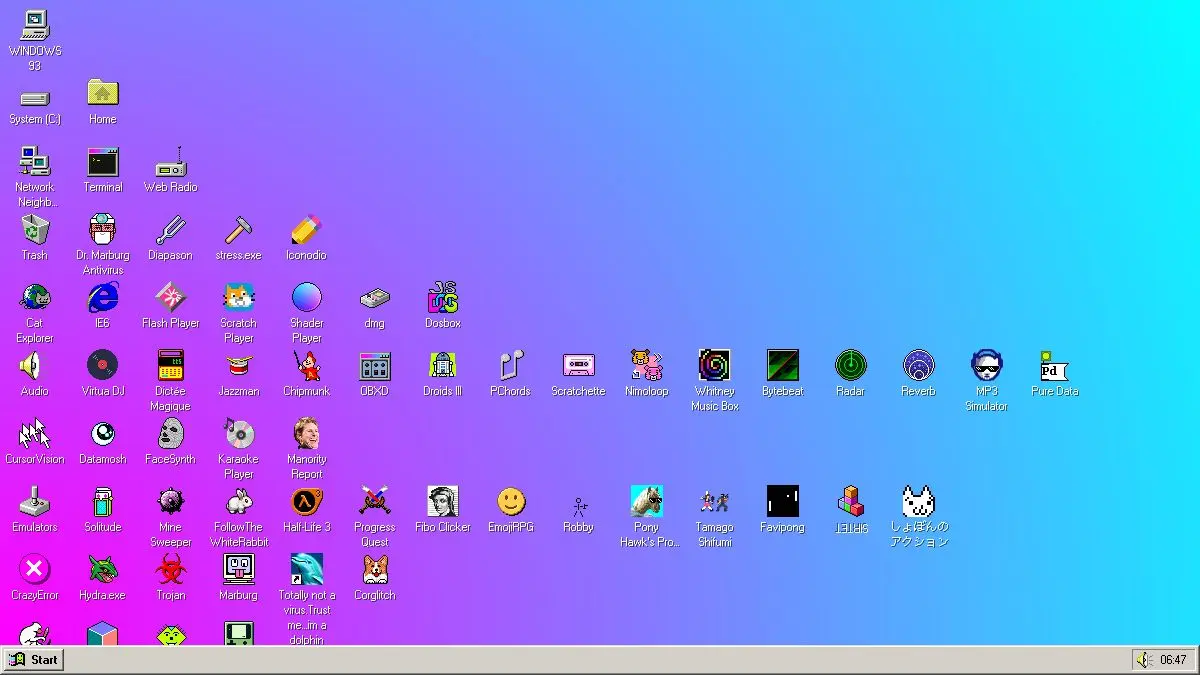
Windows 93 boots in your browser tab, in a fake low resolution, with a start menu and a desktop full of icons you should probably not double-click. There was never a Windows 93. That is why this one is so committed to the bit.
Some of the programs work. Some crash on purpose. One of them is a cat.
What is Windows 93?
It launched in 2014, made by two French artists and musicians who go by Jankenpopp and Zombectro. The conceit is an alternate-history operating system slotted into the gap between Windows 3.1 and Windows 95: the version Microsoft never shipped, from a timeline where the design language got significantly stranger.
Mechanically it is a full desktop environment written for the browser. Windows drag and resize and stack. There is a taskbar, a start menu, a trash can, a file system you can actually browse, and a terminal that accepts commands. None of it is a static image; the whole environment behaves like a real OS, right up to the moment it decides not to.
What fills that environment is the actual work. There are dozens of applications, and they range from genuinely functional to elaborately pointless. A file explorer called Cat Explorer. A pixel-art editor. A MIDI jukebox playing the kind of music that used to arrive unbidden on a web page. Small games, including a 3D maze and something involving a pony. A desktop companion called Virtual Girl. Star Wars rendered in ASCII. Pop-ups warning you about viruses that do not exist.
The tone sits somewhere between nostalgia and hostility. It is affectionate about the era’s beige interfaces and system sounds, and simultaneously happy to fill your screen with flashing garbage until you close the tab. Coverage at the time reached for descriptions like Windows 95 on drugs, which is roughly correct.
More than a decade on, it holds up better than most jokes of its vintage, mainly because there is so much stuff in it. Nobody finds everything on a first visit. People still post screenshots of apps that other long-time visitors have never seen.
What can you do with Windows 93?
- Explore the start menu. Standard entry point. It is organized like a real 90s start menu and full of things that are not.
- Browse the file system. Open the explorer and go through the folders. A significant share of the software is not in the menu at all.
- Use the terminal. Typing commands is the fastest route to the deeply buried material, and listing directories reveals programs by name.
- Play the built-in games. Small, ugly, and mostly playable: mazes, arcade oddities, and things that barely qualify as games.
- Make something. The pixel editor and the drawing tools are real, and you can produce actual art in an interface designed to obstruct you.
- Put on the jukebox. MIDI files, played through a fake media player, in a fake operating system. Peak experience.
- Break it. Open too many windows, click the alarming icons, run the things that warn you not to. Recovering is one page refresh.
Tips to get the most out of it
Turn the sound on. System bleeps, MIDI music and startup noises are half of what makes the illusion land. On mute it is just an odd-looking desktop.
Use a desktop browser. A window manager needs a mouse and screen space. On a phone the dragging, stacking and right-clicking that make it feel like an OS mostly do not work.
Right-click everywhere. The desktop, the icons, the window frames. Context menus are hiding options that appear nowhere else.
Learn a couple of terminal commands. Even basic directory listing turns the site from a menu of a dozen apps into a menu of many more. This is the single biggest upgrade to a visit.
Do not panic at the warnings. The virus alerts, the crash screens and the ominous dialogs are set dressing. Nothing here can reach your actual machine.
Give it a proper session. Fifteen minutes of clicking finds the surface layer. The good material is two or three folders deep and rewards being nosy.
If you like Windows 93, also try…
- My90sTV: the television half of the same nostalgia, complete with channel surfing and commercials.
- Webamp: a pixel-perfect Winamp in the browser that plays your actual music files.
- JS Paint: a faithful recreation of MS Paint, and unlike most of Windows 93, entirely sincere.
- Space Jam 1996: the real thing rather than a parody, a 1996 website still running as built.
More alternate-timeline computing in Weird & Wonderful, and more ways to lose an afternoon in Entertainment & Fun.
Frequently asked questions
What is Windows 93?
Windows 93 is a browser-based art project that simulates an operating system that never existed, imagined as something between Windows 3.1 and Windows 95. It has a desktop, a start menu, a file system and dozens of small applications, most of which are jokes. It was made by the French artists Jankenpopp and Zombectro and launched in 2014.
Is Windows 93 safe to use?
Yes. It runs entirely inside your browser tab as a web page and cannot touch your real computer. Part of the humor involves fake virus warnings and alarming pop-ups, which are props rather than actual threats. Closing the tab ends the whole thing.
Is Windows 93 made by Microsoft?
No. It is an independent parody with no connection to Microsoft, and no version of Windows was ever released in 1993. The name and visual style are the joke.
How do I find the hidden apps in Windows 93?
Open the file explorer and browse the folders rather than relying on the start menu, since plenty of programs are not listed there. The built-in terminal is the other route: listing directory contents turns up applications you would otherwise never see.