// 2026-08-05 · Weird & Wonderful · by Bob Smith
CERN Line Mode Browser: The Web Exactly As It Was Invented
A faithful in-browser emulation of the 1990s Line Mode Browser, rendering the world's first website as numbered text links on a black terminal screen.
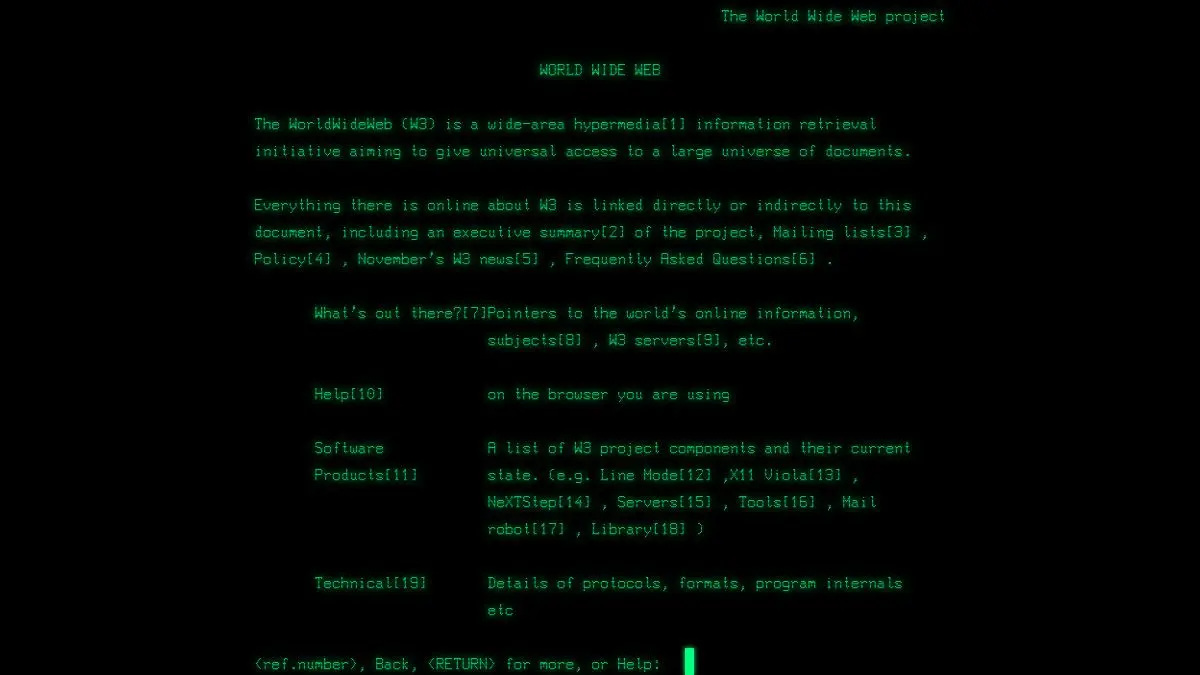
CERN Line Mode Browser is a website that renders other websites the way a browser did in 1991. Black screen, monospaced text, no images, no colors, no mouse. Hyperlinks appear as numbers in square brackets, and to follow one you type the number and press enter. The page it loads by default is the original World Wide Web project page, which is to say the first website, viewed in something close to the software that would have shown it to you at the time.
What is the Line Mode Browser?
When Tim Berners-Lee built the first web browser at CERN, it ran on a NeXT workstation, which almost nobody had. The web was theoretically universal and practically accessible to a single machine in one building. That was a problem, and the Line Mode Browser was the fix.
Written by Nicola Pellow, a young member of the team, it was designed to run anywhere. Not on graphical workstations, on anything: VT100 terminals, teletypes, whatever an institution happened to own. It output plain lines of text and took typed input. No graphics capability required at all. This is why it mattered so much. The Line Mode Browser is the piece of software that turned the web from a demo into something a physicist in another country could actually reach.
The emulation you can visit now was built as a heritage project by a team working at CERN, recreating the browser’s rendering and behavior in modern web technology so that the experience does not require a museum machine. It is not a screenshot or a video. It is functional. You are navigating, in the original grammar.
That grammar takes about ninety seconds to learn and is genuinely instructive. Links are numbered, in order, as they appear. To go somewhere you read the number and type it. There is no hovering, no visual preview of the destination, no opening things in a new tab, no scrolling ahead to see how long the page is. Every choice is deliberate, and the whole model of browsing is different as a result. You do not skim. You read, then you decide.
The default document makes the whole thing better. TheProject.html is Berners-Lee’s own page explaining what this “WorldWideWeb” thing is, written for an audience that had never encountered a hyperlink. It defines the terms. It explains, patiently, what you can do. Reading that text in that browser is about as close as anyone can get to standing at the beginning.
What can you do with the Line Mode Browser?
- Read the first website in its original form. The CERN project page, rendered as its first readers would have seen it.
- Navigate by number. Type a bracketed link number, press enter, go. The complete interaction model.
- Browse the surrounding CERN hypertext. The original documentation set is still linked together, so you can wander through the early web’s own explanation of itself.
- See how modern pages degrade. Feeding it a contemporary URL is an unforgiving accessibility test of what your page is without CSS or JavaScript.
- Watch the rendering behavior. The emulation reproduces the paced text output, which is a detail people always underestimate until they see it.
- Use it as a teaching tool. Nothing explains what a hyperlink fundamentally is faster than a numbered list you have to type into.
Tips to get the most out of it
Read TheProject.html all the way through. It is short, and it is the founding document explaining the web to people who had no concept of it. The tone is remarkable: careful, unhurried, faintly hopeful.
Actually navigate by typing numbers. The temptation is to look at the screen, appreciate the aesthetic, and leave. Following three or four links properly is where the difference in how browsing felt actually registers.
Notice what you cannot do. No back button in the modern sense, no tabs, no search, no sense of how big the page is. The absences teach more than the features.
Try it on a text-heavy modern site. Pages built on solid HTML survive surprisingly well. Pages that are a JavaScript shell around an empty div do not, which is a useful thing to know about your own work.
Show it to someone who thinks the web is inherently visual. It has never been. The visual layer arrived later, on top of a system that worked fine in text.
Do not expect it to be usable for anything. This is a museum piece with a working engine, not a browser. Look, learn, leave.
If you like the CERN Line Mode Browser, also try…
- Space Jam 1996: a real website from the early web, still live and unchanged.
- Internet Archive / Wayback Machine: the full historical record of everything the web used to look like.
- Cameron’s World: a collage assembled from the wreckage of GeoCities.
- suckless.org: a modern site that never abandoned the plain-text sensibility.
More artifacts from the web’s strange past in Weird & Wonderful, with the historical record itself over in Data & Research.
Frequently asked questions
What is the CERN Line Mode Browser simulator?
It is a web-based recreation of the Line Mode Browser, the early text-only browser built at CERN at the start of the 1990s. It renders pages the way that browser did, as plain monospaced text on a black screen with hyperlinks shown as numbers in brackets. The default page it loads is the original World Wide Web project page, the first website.
What was the Line Mode Browser?
The Line Mode Browser was one of the earliest web browsers, developed at CERN by Nicola Pellow shortly after Tim Berners-Lee's original browser. Its purpose was portability: it ran on almost any terminal, including dumb text terminals with no graphics at all, which meant the web could be reached from the wide variety of machines in use at the time.
How do you follow links in the Line Mode Browser?
Links appear as numbers in square brackets next to the text they belong to. Instead of clicking, you type the number and press enter. There is no mouse, no back button in the modern sense, and no visual distinction between a link and any other text beyond that bracketed number.
Is it free to use?
Yes, it runs entirely in your browser at CERN's site with nothing to install and no account. It was built as a heritage project to preserve what the early web experience actually felt like.
Visit CERN Line Mode Browser →
← All posts · Browse the directory