// 2026-08-05 · Music & Audio · by Bob Smith
WebSDR: Tune Radio Receivers Around the World From Your Browser
WebSDR lets you listen through real shortwave receivers in other countries, tuning the dial yourself in a browser tab. No hardware, no antenna, no software.
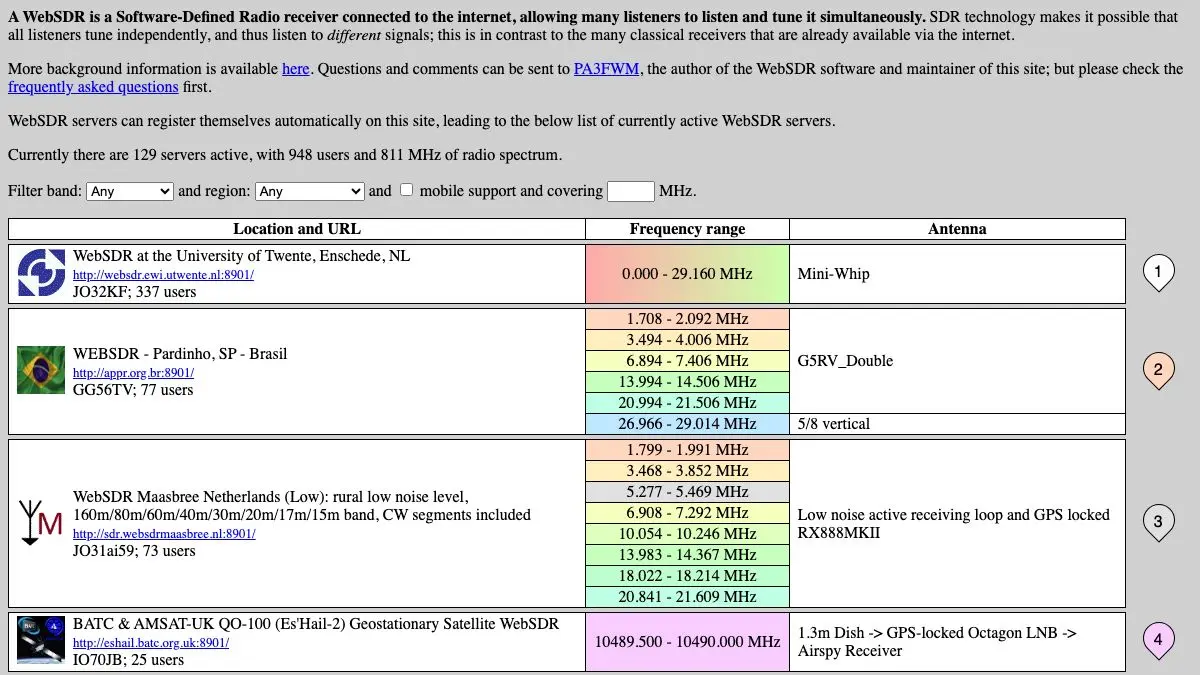
WebSDR is a radio receiver that lives in someone else’s back garden, and you are allowed to turn the dial. Pick a receiver in the Netherlands, Poland, Japan, or Argentina, drag across a waterfall display of the entire shortwave spectrum, and listen to whatever that antenna is hearing at this exact moment. No hardware. No software. No license. Just a browser tab and a large piece of wire on the other side of the planet.
What is WebSDR?
The trick that makes it work is worth understanding, because it is genuinely clever. A conventional radio receiver can be tuned to one frequency at a time, which means one listener gets one station. A software-defined radio does something different: it digitizes a huge chunk of spectrum all at once and does the tuning in software afterward.
WebSDR takes that and puts it on a server. The receiver captures megahertz of bandwidth continuously, and every visitor gets their own independent software tuner working on the same stream. A hundred people can be listening to a hundred different frequencies through one antenna, and none of them interfere with each other.
The project came out of the University of Twente in the Netherlands, developed by Pieter-Tjerk de Boer, and the Twente receiver remains the flagship: it covers the entire shortwave range in one continuous window, fed by an antenna that has been quietly famous among radio hobbyists for years. Dozens of other operators have since installed the software on their own setups, and websdr.org lists them all.
What you get in the browser is a waterfall: a scrolling visualization of signal strength across frequency, with time running downward. Carriers show up as vertical lines. Voice transmissions look like fuzzy vertical smears. Digital modes look like barcode. You click on a line and hear it.
That visual layer is the part that converts casual visitors into people who lose an evening. You are not hunting blindly through static, you can see where the signals are.
What can you do with WebSDR?
- Pick a receiver anywhere. The directory lists stations across Europe, Asia, the Americas, and Oceania, each with its own antenna, frequency coverage, and local noise floor.
- Tune by clicking the waterfall. Drag, zoom, and click directly on a signal instead of typing frequencies, though you can type them too.
- Switch demodulation modes. AM, FM, USB, LSB, and CW are all available, and choosing the wrong one is the single most common reason a signal sounds like garbage.
- Listen to amateur radio in progress. The 40m and 20m bands are usually busy with actual conversations between operators, often across continents.
- Catch international shortwave broadcasters. State and religious broadcasters still transmit on shortwave, and hearing one fade in from thousands of miles away has not lost its novelty.
- Hear time signal stations. Precise, mechanical, endlessly repeating station identifications that exist purely to tell the world what time it is.
- Compare propagation between receivers. Open two receivers on different continents and tune both to the same frequency to see who can hear it.
- Bookmark specific frequencies. Receiver URLs encode the frequency and mode, so you can save or share a link that opens exactly where you left it.
Tips to get the most out of it
Get the mode right before you conclude nothing is there. Amateur voice traffic on the lower bands is almost always LSB below 10 MHz and USB above it. A perfectly clear conversation is completely unintelligible in the wrong sideband, and beginners write off entire bands because of this.
Listen at night for distance. Shortwave propagation depends on the ionosphere, and the long-distance paths generally open after dark. The same frequency that gave you nothing at noon can be crowded with signals from the other side of the world at midnight.
Try a receiver on another continent for the same band. Radio conditions are intensely local. If a band sounds dead through a European receiver, an Asian or South American one may be hearing it perfectly.
Zoom into the waterfall. The default view is wide enough to be overwhelming. Zooming in makes individual signals separable and turns clicking into precision tuning rather than guesswork.
Use it as a background layer. A slow, quiet amateur band conversation is one of the more pleasant ambient soundtracks available, and it costs nothing.
Do not leave receivers running for hours. These are volunteer-hosted machines with finite bandwidth. Listen as long as you like, then close the tab instead of leaving it open all week.
If you like WebSDR, also try…
- LiveATC: the same eavesdropping pleasure, aimed at air traffic control frequencies.
- Radio Garden: spin a globe and hear local FM stations from anywhere, no propagation required.
- Radiooooo: pick a country and a decade and listen to what was playing there.
- Frequency 2156: a strange, half-imaginary radio transmission from the future.
More listening in Music & Audio, and more things worth staring at in Weird & Wonderful.
Frequently asked questions
What is WebSDR?
WebSDR is a system that puts a real software-defined radio receiver on the internet so many people can listen to it at once, each tuned to a different frequency. The site websdr.org is the directory of participating receivers, most of them run by amateur radio operators and universities. You click a receiver, pick a frequency on a waterfall display, and hear whatever that antenna is picking up right now.
Is WebSDR free?
Yes. The receivers are volunteer-operated and free to use, with no account required on most of them. Some hosts ask that you do not leave a receiver running unattended for hours, since bandwidth and server capacity are donated.
Do I need a radio license to use WebSDR?
No. Listening is entirely passive and requires no license anywhere that WebSDR operates. You are only receiving, never transmitting. A license is only relevant if you eventually want to talk back on the amateur bands yourself.
What can you actually hear on WebSDR?
Depending on the band and time of day: amateur radio conversations, international shortwave broadcasters, maritime and aviation traffic, time signal stations, digital data modes, and a lot of atmospheric noise. Nighttime is generally better for long-distance shortwave reception, and conditions change constantly.