// 2026-08-05 · Entertainment & Fun · by Bob Smith
My Retro TVs: Channel Surfing Through Decades of Old Television
My Retro TVs puts a rendered vintage television in your browser and lets you turn the dial through archived programming from the 1950s to the 1990s.
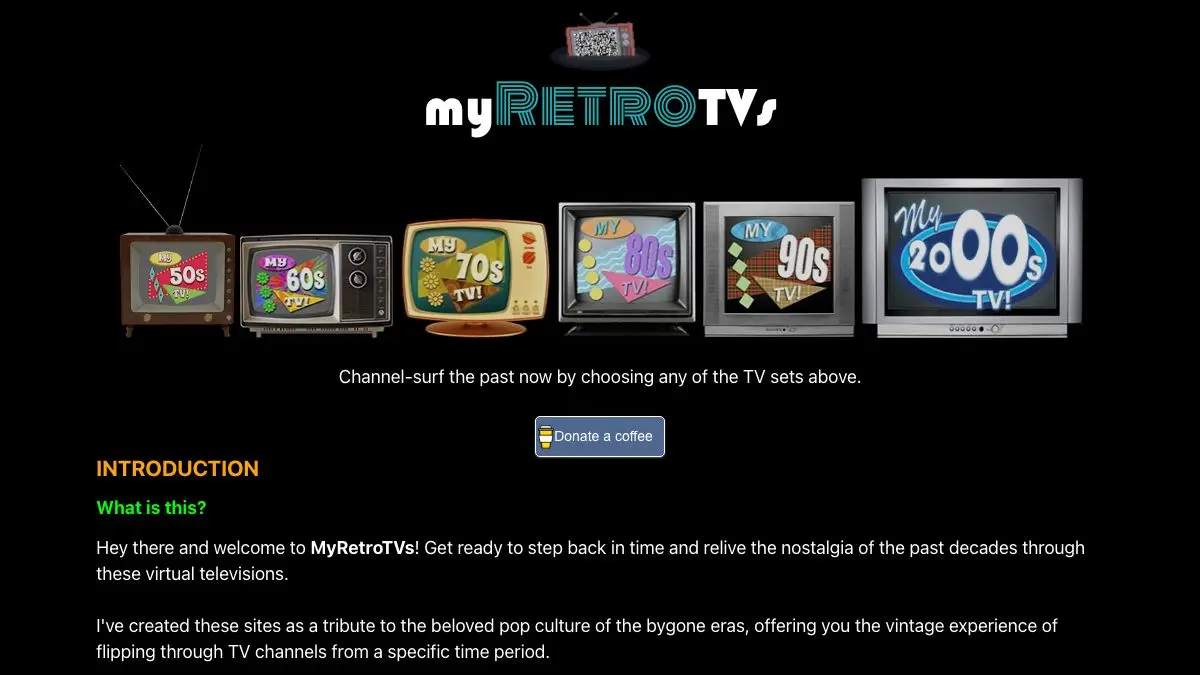
My Retro TVs is a television set that lives in your browser. Not a video player styled to look like one, an actual rendered set with a cabinet, a speaker grille, and a dial you turn to change the channel. Pick a decade and it fills with era-appropriate programming: half a variety show, a cigarette ad, a station ident, a weather report from a man in a very wide tie.
There is no schedule. There is no menu of episodes. You turn the dial and take what comes, which turns out to be the entire point.
What is My Retro TVs?
Old television is not hard to find. The Internet Archive and YouTube hold enormous amounts of it: broadcast recordings, commercial reels, local news, station idents that nobody thought worth keeping until suddenly everybody did. The problem is that a search box is a terrible way to experience any of it. Searching for a clip is the opposite of watching TV.
My Retro TVs solves that by rebuilding the delivery mechanism instead of the content. The site presents a specific television, drawn to match the decade you chose, and plays the archived material through it. The 1950s set is a wooden box with a small rounded screen and a picture that looks like it is being received rather than streamed. By the 1990s you get a chunkier plastic thing with a better tube and a run of commercials you will recognize whether you want to or not.
The simulation goes further than the frame. Channels change with a click and a moment of static. The picture carries scan lines and a slight curve. Sound is thin and centered, the way a single speaker in a wooden cabinet actually sounded. None of this is necessary to play a video, and all of it is why the site works.
What it produces is the sensation people actually miss, which is not any particular show. It is passivity. Somebody else picked what was on, you arrived in the middle of it, and you watched because it was there. That mode of viewing has been engineered out of every modern service, and this is one of the few places it still exists.
What can you do with My Retro TVs?
- Pick a decade and let it run. Each era gets its own set, its own picture quality and its own pool of programming.
- Turn the dial. Click through channels the way you would have with a physical knob, static and all.
- Watch the commercials. The ad breaks are frequently better than the shows, and they date a decade faster than anything else on screen.
- Catch station idents and sign-offs. Test cards, network logos, the national anthem playing over a flag at two in the morning.
- Compare eras directly. Jumping from a 1960s broadcast to a 1980s one in ten seconds makes the changes in pacing, editing and voice-over style extremely obvious.
- Leave it on in a corner. It works well as ambient background, which is exactly the job real television used to do.
Tips to get the most out of it
Go full screen and turn the lights down. The illusion depends on the set filling your field of view. In a small window it is a novelty; full screen and dim, it is genuinely convincing.
Resist the urge to skip. The temptation to hunt for something good will ruin it. The value is in accepting whatever the channel gives you, including the four minutes of local car dealership advertising.
Try the decade you did not live through. Everyone goes straight to their own childhood. The unfamiliar decades are stranger and more informative, because you have no nostalgia buffering the weirdness.
Watch with someone older. Nothing pulls stories out of a parent or grandparent faster than an advertisement they have not seen in forty years.
Use headphones for the audio detail. The muffled, mono, slightly distorted sound is a big part of the reconstruction and it gets lost on laptop speakers.
If you like My Retro TVs, also try…
- My90sTV: the same idea aimed squarely at the 1990s, complete with a channel guide.
- TV Garden: live broadcast television from around the world, arranged on a globe.
- The Nostalgia Machine: pick a year and get the music videos that were unavoidable that summer.
- Nestflix: a streaming catalog made entirely of fake shows and films from inside real ones.
More time travel in Entertainment & Fun, and more oddities in Weird & Wonderful.
Frequently asked questions
What is My Retro TVs?
My Retro TVs is a website that simulates watching television on a period-appropriate set. You pick a decade, and the site displays a rendered vintage TV playing archived clips from that era, including show segments, commercials and news footage. The dial changes channels and the picture is filtered to look like the hardware of the time.
Is My Retro TVs free?
Yes, it is free and requires no account. The video comes from publicly available archived footage, so there is nothing to install and nothing to sign up for.
Which decades can you watch?
The site covers television roughly from the black-and-white era through the 1990s, with a different simulated set for each decade. Each one has its own housing, its own picture quality and its own selection of programming, so a 1960s channel looks and sounds nothing like a 1990s one.
Does My Retro TVs work on a phone?
It runs in a mobile browser, but the experience is built around a large rendered television with visible knobs and cabinet, so a desktop screen does it far more justice. On a phone the set shrinks down to something closer to a video player with decoration.