// 2026-08-08 · Privacy & Security · by Bob Smith
BrowserLeaks: See Exactly What Your Browser Gives Away
BrowserLeaks runs a dozen free tests on your browser and shows the raw data it leaks: IP, WebRTC, canvas and WebGL fingerprints, fonts, TLS and more.
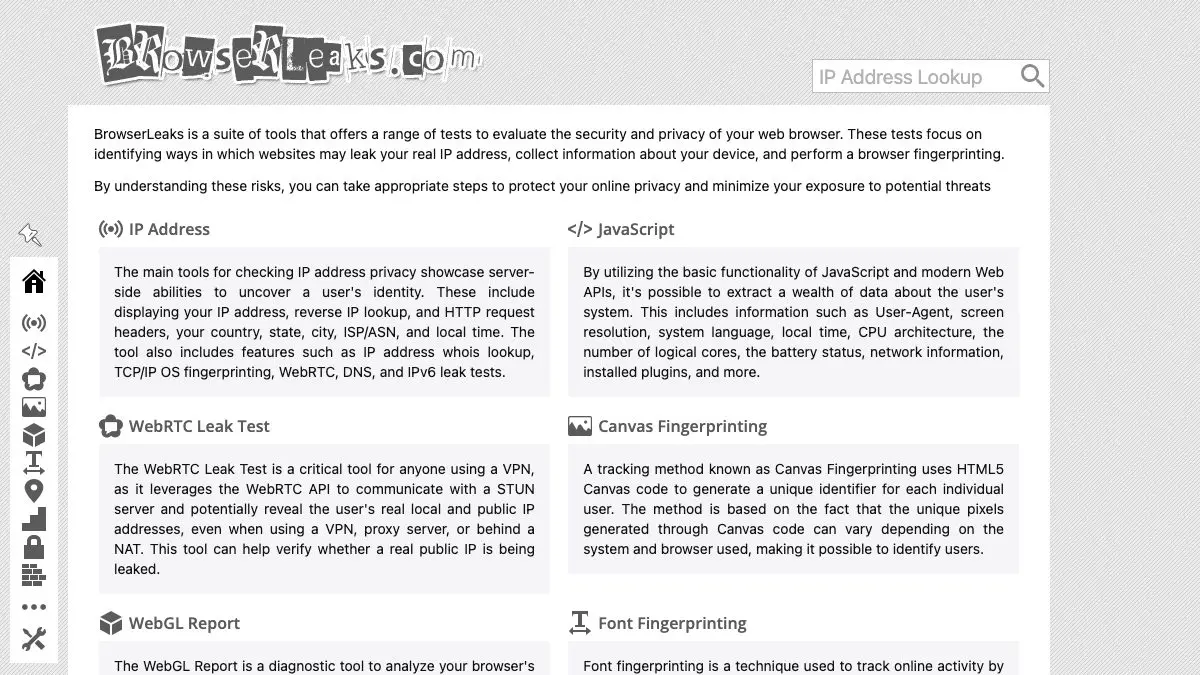
BrowserLeaks is a free set of tests that show you, in raw and uncomfortable detail, what your browser tells every website you visit. Not a privacy score. Not a green checkmark. The actual IP addresses, the actual fingerprint hashes, the actual list of fonts installed on your machine.
It is the tool to reach for the moment you find yourself asking “is my VPN actually working?” or “did that extension do anything at all?”
What is BrowserLeaks?
BrowserLeaks is a collection of independent test pages, each one focused on a single leak channel. You do not run one big scan and get a verdict. You pick the thing you are worried about, open its page, and read the data.
That structure is the whole point. Fingerprinting is not one problem, it is a dozen small ones stacked together, and each has a different fix. Your WebRTC leak is solved by a browser setting. Your canvas fingerprint is solved by a different browser entirely. Lumping them into a single score hides which lever to pull. BrowserLeaks keeps them separate and shows its working.
Each page also explains the mechanism in plain language underneath the results, so you leave understanding why the data leaks rather than just that it does.
What can you do on BrowserLeaks?
- Check your IP address and DNS, including IPv6 and the DNS servers actually resolving your queries, which often belong to your ISP even when you think they do not.
- Run the WebRTC leak test, the single most useful page on the site. If your real IP appears here while a VPN is connected, your VPN is leaking.
- Get your canvas fingerprint as a hash, along with how rare that hash is. This is the technique most trackers reach for first.
- Read a full WebGL report: GPU vendor, renderer string, supported extensions and a fingerprint built from them. Laptops are alarmingly identifiable this way.
- See your font fingerprint, the list of typefaces installed on your system. Design software and language packs make this a near-unique signature.
- Inspect the TLS client test, which shows your handshake, cipher suites and a TLS fingerprint (JA3-style) visible before a single byte of your page loads.
- Test the Geolocation API to see what the browser reports and how permission prompts behave.
- Dump everything JavaScript can see: user agent, screen size, CPU cores, time zone, language, platform.
- Check content filters, HTTP/2, QUIC, TCP/IP fingerprinting, WebGPU and Chrome extension detection in the extra tools.
Tips to get the most out of it
- Test one change at a time. Note the fingerprint, change one setting or install one extension, reload the page. Changing three things at once tells you nothing about which one worked.
- Open the same test in two browsers side by side. Comparing your daily browser against a hardened one is the fastest way to see what hardening buys you.
- Reload the canvas test twice. If the hash changes between reloads, your browser is randomising it per session, which is a deliberate anti-fingerprinting strategy and a good sign.
- Check WebRTC before you trust any VPN. Connect, load the page, look for your home IP. Do this again after every browser update.
- Remember that “unique” is the real risk. A rare configuration is more trackable than a common one, which is why aggressive customisation can make you easier to follow, not harder.
- Bookmark the specific test pages you care about, not just the homepage. You will come back to the WebRTC and canvas pages far more often than the rest.
If you like BrowserLeaks, also try…
- Cover Your Tracks: EFF’s friendlier take, which tells you how uniquely identifiable you are overall.
- Webkay: the same “look what your browser reveals” idea, presented as one shocking scrollable page.
- Blacklight: points the microscope outward and shows which trackers a given website runs on you.
- Privacy Guides: once BrowserLeaks shows you the problem, this is where you find the tools to fix it.
Browse more tools for locking things down in our Privacy & Security collection.
Frequently asked questions
What is BrowserLeaks?
BrowserLeaks is a free suite of browser privacy and security tests. Each test targets one specific way a website can identify or track you, such as your IP address, WebRTC connections, canvas rendering, installed fonts or TLS handshake, and shows you the exact values your browser hands over. It is a diagnostic tool rather than a scanner that hands you a single pass or fail grade.
Is BrowserLeaks free, and does it store my data?
Yes, every test is free and no account is required. The site states that it does not collect personal data or store user fingerprints, and the tests run in your own browser against its servers. You can run any test as many times as you like, which is exactly what you want when you are comparing browsers or checking whether an extension actually changed anything.
What is a WebRTC leak and why does it matter?
WebRTC is the browser technology behind video calls, and it can ask your operating system for your real local and public IP addresses directly, bypassing your VPN or proxy. That means a site can see the IP you thought you had hidden. BrowserLeaks has a dedicated WebRTC test that shows precisely which addresses are exposed, which is the fastest way to confirm whether your VPN setup is actually leaking.
Can I stop canvas and WebGL fingerprinting?
Not completely, but you can change the economics. Canvas and WebGL fingerprints come from tiny differences in how your specific GPU, drivers and font stack render an image, so blocking them outright breaks pages. Browsers like Tor Browser, Brave and Firefox with resistFingerprinting either return a uniform value or add per-site noise. BrowserLeaks is how you check which approach your browser is using, because it shows the hash and tells you how common it is.